Zero Retries 0166
2024-08-23 — New Product from Masters Communications - DRA-Pi-Zero
Zero Retries is an independent newsletter promoting technological innovation that is occurring in Amateur Radio, and Amateur Radio as (literally) a license to experiment with and learn about radio technology. Radios are computers - with antennas! Now in its fourth year of publication, with 2000+ subscribers.
About Zero Retries
Steve Stroh N8GNJ, Editor
Jack Stroh, Late Night Assistant Editor Emeritus
In this issue:
Report from the International Earth Moon Earth (EME) 2024 Conference
Hacking the [Quansheng] UV-K6 [Portable Radio] for Digital Modes
The Beginners Guide To The Radioberry HF SDR Transceiver Pi Hat - YouTube
EggNOGS (Eggbeater) Antenna Kits Now Available for Five Bands
APRS Messaging Being Covered by Jason Oleham KM4ACK (Videos)
Raspberry Pi 5 For Radio Amateurs With The RTL-SDR V4 (Video)
Comments for This Issue (redirect to Comments page)
Web version of this issue - https://www.zeroretries.org/p/zero-retries-0166
Request To Send
Commentary by Editor Steve Stroh N8GNJ
Paid Subscribers Update
My thanks to Merik Karman VK1DF / VK2MKZ for renewing as a Founding Member Annual Subscriber! (Previously acknowledged in Zero Retires 0161 as “Prefers to Remain Anonymous 39”.)
My thanks to Rick Prelinger W6XBE for becoming a new Founding Member Annual Subscriber to Zero Retries this past week!
My thanks to Don Coker KM6TRZ for renewing as an Annual Paid Subscriber this past week!
My thanks to Prefers to Remain Anonymous 45 for upgrading from a free subscription to an Annual Paid Subscriber this past week!
My thanks to Prefers to Remain Anonymous 46 for becoming a new Annual Paid Subscriber this past week!
Financial support from Zero Retries readers is a real vote of confidence for continuing to publish Zero Retries.
ARRL Division Elections - My Endorsements For Northwestern Division
I generally avoid Amateur Radio “politics” in Zero Retries, but my endorsement is based in large part on one of the candidates for Northwestern Division Director being involved in Zero Retries Interesting activity - RATPAC video seminars, and thus it seems appropriate to mention that perspective in Zero Retries.
For the upcoming elections for ARRL Division leadership, I endorse
- Dan Marler K7REX for ARRL Northwestern Division Director
- Michael Sterba KG7HQ for ARRL Northwestern Division Vice Director
KG7HQ for Vice Director was unopposed, so he’s in.
Congratulations Michael! Serve Long, and Prosper! 🖖
I’ve known KG7HQ for decades now and he has served quietly and capably in Northwestern Division leadership since I’ve known him. I’m confident he will serve the members of the ARRL Northwestern Division even better in his new role.
K7REX is the challenger in the upcoming election for Northwestern Division Director and I endorse him because of his leadership in the RATPAC (Radio Amateur Training Planning and Activities Committee) organization. RATPAC is an ongoing seminar held online of all things Amateur Radio. One thing that I appreciate about RATPAC is that it actively encourages presentations about technical topics (often Zero Retries Interesting), and it embraces all Amateur Radio Operators, regardless of ARRL membership.
In short, I have watched and listened to many RATPAC programs, some live, some from its archive, and learned a lot from them. I cannot say the same about any ARRL equivalent programming (if it even exists). Thus I think that the example of RATPAC is a good example of the future of Amateur Radio, rather than the “mostly paywalled” offerings from the ARRL.
It’s my guess / hope that K7REX has received far greater exposure to Amateur Radio as a whole through his leadership and participation in RATPAC. That cannot help but inform K7REX better than the “silo’d” experiences of a typical ARRL Division Director attending mostly ARRL sanctioned events.
If the ARRL is to have a reasonable future in US Amateur Radio, it will have to develop a solution to the existential threat / challenge of ARRL current membership numbers of < 20% (and falling) within US Amateur Radio Operators. I think ARRL and Northwestern Division has a better chance to tackle this issue with K7REX as Northwestern Division Director, than his opponent.
Starlink - Mobile Usage and DNS Issues
Starlink continues to be in the news. I’m seeing so many mentions of Starlink that I lose track of them. One of the more interesting mentions I saw of Starlink is the increasing use of Starlink Mini in vehicles. Apparently the Starlink Mini unit is lightweight enough that people are building (or buying) lightweight frames for it to which they attach suction cups and then attach it to a sunroof on a vehicle and then have in-transit broadband connectivity wherever they go.
One surprising “suction cup” installation I saw was in a private plane that had a sunroof in the rear of the fuselage. The Starlink Mini was suction cupped to the plane’s sunroof and the plane’s owner report that it worked fine as long as his groundspeed didn’t exceed (I forget the number). It occurred to me that this was the very first time such small planes could have broadband Internet access while in flight. Cellular isn’t an option for a plane in flight (unless you’re flying pretty low so as not to be heard on too many cell sites simultaneously), nor is GEO satellites, and Iridium isn’t exactly “broadband” connectivity (or inexpensive).
I finally discovered I had a “gripe” about Starlink - the Domain Name Server (DNS) Starlink provides, or direct their users to, is a known issue. I had been having inexplicable, seemingly random errors on my phone and tablet ever since switching over to Starlink from Comcast, or the new Wi-Fi access point in the house. I finally typed in a long description of the issue into a web search, and finally found an answer! A poor DNS experience is a known issue with Starlink and as soon as I put in a manual DNS entry on my phone and tablet, they began working better than I can remember. In the near future I’ll go into my Starlink router and put in manual DNS entries so I don’t have to put manual DNS entries into every individual device on my network. With that issue resolved, now I’m really happy with Starlink service for my household!
Ziply Fiber - Not Very “Zippy”
Underground utility survey crews came through our neighborhood more than a month ago on behalf of Ziply Fiber. By now the paint marks are fading on lawns from grass growing out, and the electric utility surveyors left little red flags that are now getting removed for lawn mowing, but still no sign of Ziply Fiber coming anytime soon.
Having seen my interest in possibly getting fiber Internet service from Ziply, my wife Tina called the number on the Ziply Fiber door hanger left on our front door around the same time as the utility surveys crews did their thing. When Tina talked to the Ziply Fiber call center, they sounded puzzled that she was calling and said our neighborhood was not shown as scheduled for fiber deployment.
The call center person said “Thank you for your interest, and when your neighborhood is going to get Ziply Fiber, a crew will come through and leave door hangers on your front door.” Tina said, stunned… “Ma'am… I’m calling this number because of the door hanger left on my front door”. They had no further comment.
Help Requested For Wikipedia Editing - “9600 Port”
In this issue, from the article on the new Masters Communications DRA-Pi-Zero, I looked up the article 9600 port on Wikipedia.
It’s good that article is there, as a reference, but it really needs some work.
This paragraph:
This port is capable of transmitting and receiving data at speeds of at least 9600 bits per second, but usually faster. This is achieved by bypassing the highpass, lowpass, preemphasis, and deemphasis filters normally contained in the microphone and speaker circuits of an FM transmitter and receiver.[1]
is particularly problematic, but there are other issues that are readily apparent to those of us who are familiar with this subject.
The main issue that needs to be addressed in this article is that the signals in question that are sent through this port / connector are analog, not digital.
Other issues that I would love to see addressed:
- The signals are mostly standardized, but not the signal levels (amplitude), which can vary widely between radios and modems.
- The terminology that I’ve seen that gets the point across about no pre-emphasis or de-emphasis is flat audio (which I picked up in reading technical material about repeater audio interfacing), and it would be nice if that could be incorporated into the article as I think “flat audio” helps get the point across about lack of pre-emphasis and de-emphasis.
- It would be nice if the Module 17 could be worked into the list of devices since it requires the use of a radio with a “data jack”.
- Other devices that use this jack now are the new N7EBB Radio Interface Board, the Masters Communications DRA-Pi-Zero, the NW Digital Radio DRAWS, the WB7FHC Nexus DR-X, and many Masters Communications audio adapters.
- In current production, the Yaesu FTM-6000R and other Yaesu radios featuring System Fusion provide flat audio, and with the use of an available adapter cable from Yaesu, have this connector.
- Also in current production, the BCM-144, BCM-220, and BCM-440 mobile radios from Bridgecom also provide flat audio, with the use of an adapter from Masters Communications.
- Numerous other radios that have flat audio available, but not this connector, but adapters from Masters Communications and RPC Electronics remedy that situation.
I request that some of you knowledgeable Zero Retries readers do an update of this article. It’s a needed and useful reference and it would help Zero Retries Interesting Amateur Radio activity if it was more detailed and more accurate. If someone else can do this, that frees me up to put more time into Zero Retries.
Thanks in advance!
73,
Steve N8GNJ
New Product from Masters Communications - DRA-Pi-Zero
By Steve Stroh N8GNJ
First, there was Craig Lamparter KM6LYW’s KM6LYW Radio YouTube channel:
Welcome back to KM6LYW Radio, the show about Amateur Radio or Ham Radio with an emphasis on digital or data modes, moving information back and forth using Amateur Radio, reimagining Ham Radio in the Information Age.
The KM6LYW Radio YouTube channel is exactly on target as Zero Retries Interesting, and thus it’s mentioned at the end of every issue of Zero Retries.
DigiPi Software
Some background on DigiPi… Before considering hardware, the “star of the show” is the DigiPi software (currently 1.8-3) developed by KM6LYW.
In creating the DigiPi software, KM6LYW did a stellar job of creating a critical differentiation of the typical operation of an Amateur Radio station for data communications - he built-in remote operation for the supported modes in DigiPi.
Thus you don’t connect a monitor, keyboard, mouse, etc. to a DigiPi station - you connect it to an (Amateur) radio and power supply and then tuck it out of the way. The small display is optional, but I would always want one installed for ease of troubleshooting, such as displaying the unit’s IP address, verifying that it’s up and running (not locked up).
The user interface of your data communications software of choice (APRS, Winlink, FLDigi, and many others) is routed over Wi-Fi or Bluetooth to your phone, tablet, laptop, or desktop computer. The typical “operating environment” is working Amateur Radio data modes, silently, from your lap while you’re watching television with someone else.
A frequent point of confusion about DigiPi is that when it uses Wi-Fi or Bluetooth to connect to a tablet, phone, or laptop, those connections are local, not requiring Internet.
This makes a DigiPi system ideal for an apartment or condo or dorm or other crowded living arrangement where you can’t devote much dedicated space for a data communications station (with a separate monitor, keyboard, etc.). The radio needs more room and a bit of ventilation than the DigiPi requires.
The New DRA-Pi-Zero
KM6LYW has explained his original DigiPi hardware construction well on his YouTube channel. The original DigiPi required some “bodging” of a transistor and some other components onto a Raspberry Pi Zero and an attached audio interface board called the Fe-Pi. That was functional and inexpensive.
The new Master’s Communications DRA-Pi-Zero is yet another hardware option to build your a DigiPi station.
Kevin Custer W3KKC of Masters Communications on the DRA-Sound-Cards email list:
New product sneak peek - The DRA-Pi-Zero.
What is it - and why do I need it?
Some of you are aware of a software product called DigiPi. DigiPi is a Linux based program created by Craig KM6LYW that runs on a Raspberry Pi. Craig's explanation is the best, so here it is - “The DigiPi is the ultimate hot-spot for all amateur radio data modes, including APRS, AX.25, Winlink email, ft8, js8cal, SlowScan TV, PSK31, packet and even CW. The implementation is an elegant, inexpensive, low-power, open-source Raspberry-Pi--based amateur radio data transceiver, managed exclusively by web browsers or smart-phone apps, with no bulky keyboards, monitors or complicated wiring.”
I was asked to design a “DRA” [Digital Radio Adapter] radio interface for this project. While there are other radio interface solutions “out there” for this project, some are quite large and power hungry, while others require a good bit of DIY intervention. The DRA-Pi-Zero is an attempt to make it easy to use this software with radios that don't have a built in sound card. It's interesting to note that the DRA-Pi-Zero should work with other software solutions too - not just DigiPi.
The DRA-Pi-Zero is available Assembled and Tested or as a project kit. The project kit is only recommended for very experienced builders. There are surface mount components, and while the Codec and voltage regulator come pre-installed - it's a challenging board to build due to its shear small size.
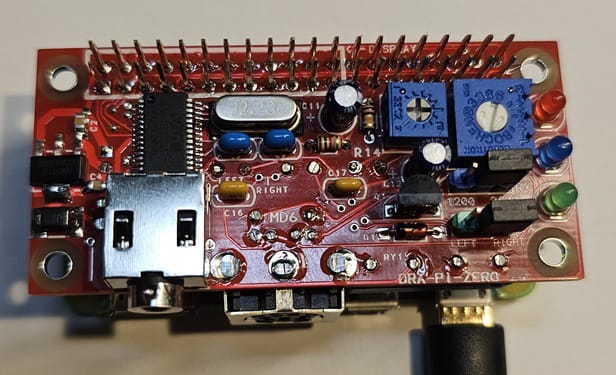
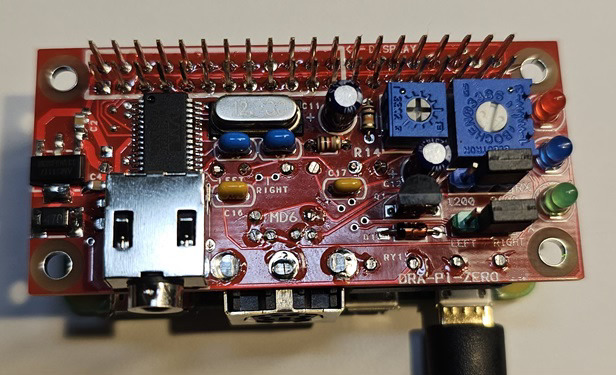
As with all other DRA devices, the audio quality is excellent - insuring the widest bandwidth and highest (most reliable) throughput. Connecting the DRA-Pi-Zero to a mobile radio or portable is made as easy as possible using one of two radio connectors - a 3.5mm TRRS and a Mini-DIN-6 female (both are included). The MD6 allows a DRAC-12 or DIN6-Shortie to connect to the vast number of digital ready radios with a matching Mini-DIN-6 data connector. The TRRS is wired to accept cables made by Digirig. The DRA-Pi-Zero has pots to properly range the TX and RX audio levels, and a high-performance reed relay to insure all radio keying (PTT) compatibility.
The DRA-Pi-Zero is designed to be stacked on a Raspberry Pi Zero 2W, as the board is the same size, but - is compatible with most other Raspberry Pi's. It has NOT been tested with the Raspberry Pi5, but the Raspberry Pi Zero, Pi3 and Pi4 all work correctly. Audio frequency response and group / phase delay was tested on 64bit Raspbian OS with a Raspberry Pi4 and Audacity. Its performance equals our other DRA products.
The extended 40 pin header allows an optional 1.3" TFT display to be stacked onto the DRA-Pi-Zero. Screen position alignment is outlined with silkscreen printing. This is truly a tiny but reliable solution that works well for portable or permanent deployments. We've tested them in bicycle races and other events and Craig has one online in active duty. Craig has a forum for DigiPi, so we won't need to duplicate that support here.
More information:
DRA-Pi-Zero Main Page.
DRA-PI-Zero Support Documentation.
DRA-Pi-Zero Construction Article.
KM6LYW's DigiPi.
Comments and questions are welcomed.
More details from the Product Support Documentation - Model DRA-Pi-Zero page:
Overview of DRA-Pi-Zero
Things that may not be otherwise obvious:
Use with KM6LYW's DigiPi Software - providing a very high quality but small form factor (Pi Zero) sound card.Here's an installation of a DRA-Pi-Zero in operation.Kits come with the surface-mount IC and regulator preinstalled - but other SMT parts do exist and need installed.Kits are only recommended for VERY experienced builders.RX audio feeds the MIC input of the chip, which by default feeds both the Left and Right channels. As such - no channel steering header is included (or needed) for RX audio.The larger pot (R12) adjusts the receive audio level.The smaller pot (R14) adjusts the transmit audio level.The LEFT / RIGHT "TX" header selects which channel feeds the transmitter - no soldering required.The TX audio signal is fed from the high-power headphone outputs to the TX header to give the most TX level possible at a low impedance.TX audio feeds pin 1 of the MD6 and Ring 1 (the ring closest to the tip) on the TRRS.PTT is available at MD6 pin 3 and Ring 2 (the ring closest to the sleeve) on the TRRS.The PTT is driven by a transistor with its bias coming from pin 32 of the 40 pin header.The Red PTT LED is in parallel with the coil of the PTT relay.The Blue Bluetooth LED is from pin 29 of the 40 pin header through a current limiting resistor.The Green Carrier Detect LED is driven from pin 36 of the 40 pin header through a current limiting resistor.
The DRA-Pi-Zero is a pretty cool development, and kudos to W3KKC for creating it1! One point of differentiation for the DRA-Pi-Zero versus others (see below) is that it’s a product of Masters Communications, which has developed a number of high-performance audio interfaces2 for use with higher speed Amateur Radio data communications modes on narrow VHF / UHF channels such as VARA FM3.
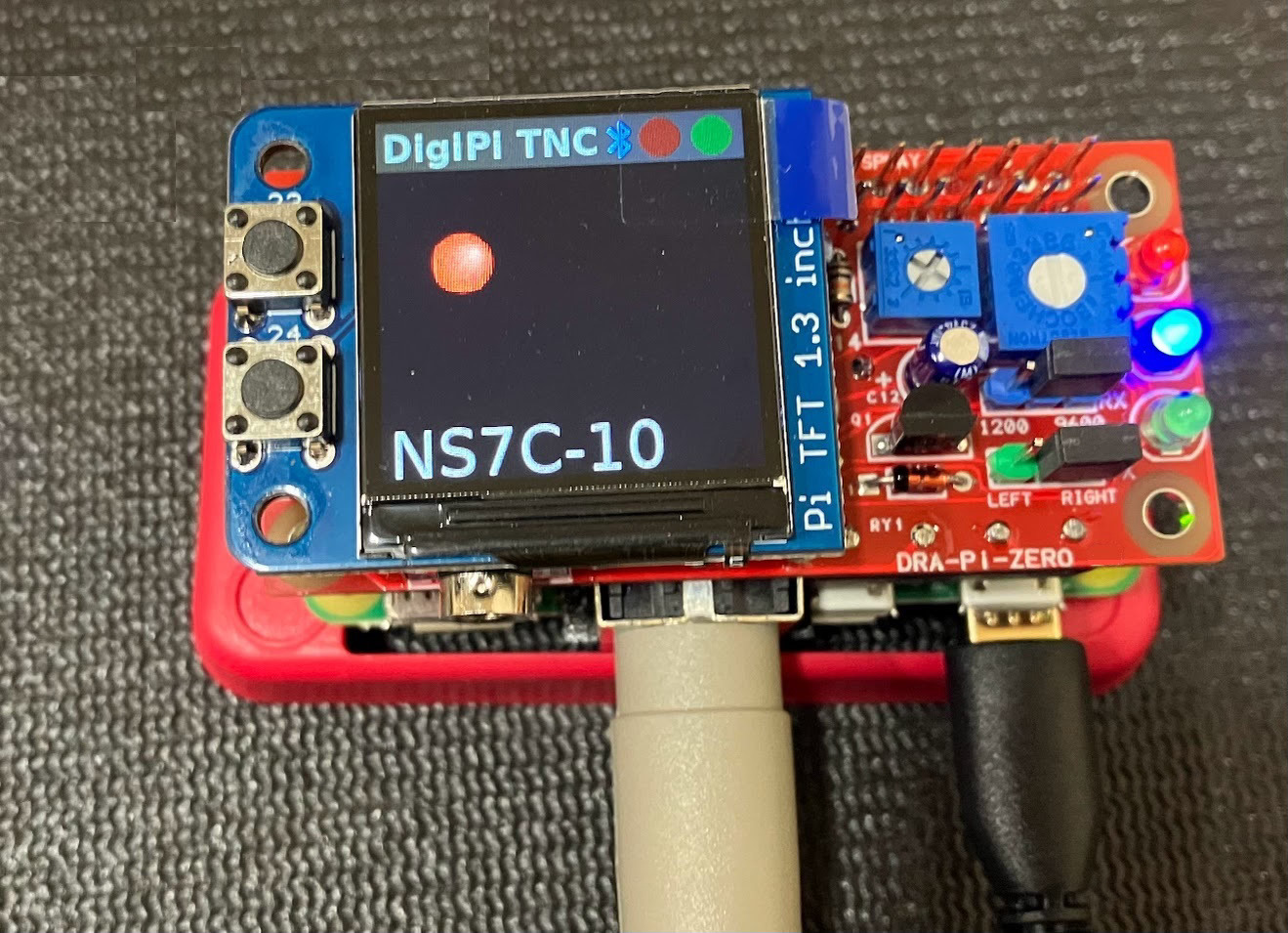
In this photo of the DRA-Pi-Zero, there’s a hint of another tacit, but important endorsement. NS7C is Scott Currie, who is very active in promoting advanced Amateur Radio data modes on VHF / UHF such as VARA FM, and helping troubleshoot data mode issues on various Amateur Radio email lists relating to data modes. NS7C’s involvement in the DRA-Pi-Zero pretty much guarantees that the DRA-Pi-Zero will support advanced data modes on VHF / UHF.
The TX and RX audio level (hardware, not software) audio adjustments (potentiometers) mean set-it-and-forget-it audio level adjustments rather than fussing with the internal audio settings within Raspberry Pi OS. Similarly, including a reed relay for Push To Talk (PTT) switching instead of using a transistor insures maximum compatibility. Some audio interfaces use a transistor which doesn’t work with every radio.
Update - KM6LYW did a video unboxing and review of the Masters Communications DRA-Pi-Zero: